
Ram 1500/2500/3500: Rear Window Features
Rear Window Defroster
.png) The rear window defroster button
is located on
the climate control panel. Press this button to turn
on the rear window defroster and the heated outside
mirrors (if equipped). An indicator in the button will
illuminate when the rear window defroster is on. The
rear window defroster automatically turns off after approximately
10 minutes. For an additional five minutes of
operation, press the button a second time.
The rear window defroster button
is located on
the climate control panel. Press this button to turn
on the rear window defroster and the heated outside
mirrors (if equipped). An indicator in the button will
illuminate when the rear window defroster is on. The
rear window defroster automatically turns off after approximately
10 minutes. For an additional five minutes of
operation, press the button a second time.
NOTE: To prevent excessive battery drain, use the rear window defroster only when the engine is operating.
CAUTION!
Failure to follow these cautions can cause damage to the heating elements:
- Use care when washing the inside of the rear window. Do not use abrasive window cleaners on the interior surface of the window. Use a soft cloth and a mild washing solution, wiping parallel to the heating elements. Labels can be peeled off after soaking with warm water.
- Do not use scrapers, sharp instruments, or abrasive window cleaners on the interior surface of the window.
- Keep all objects a safe distance from the window.
Power Sliding Rear Window - If Equipped
The switch for the power sliding rear window is located on the overhead console.
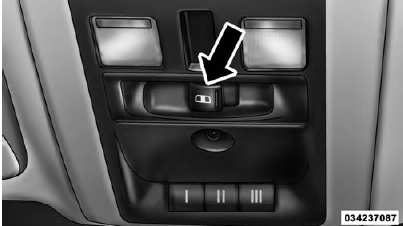
Rear Window Switch
Push the switch to the right to open the glass. Pull the switch to the left to close the glass.
Manual Sliding Rear Window - If Equipped
A locking device in the center of the window helps to prevent entry from the rear of the vehicle. Squeeze the lock to release the window.
READ NEXT:
 Fold Flat Load Floor - If Equipped
Quad Cab and Crew Cab models with a 60/40 rear seat
may be equipped with a folding load floor.
WARNING!
Do not operate the vehicle with loose items stored on
the load floor. While driving or in an acc
Pickup Box
The pickup box has many features designed for utility
and convenience.
Pick Up Box Features
Upper Load Floor Indents
Bulk Head Dividers
Cleats
NOTE: If you are installing a Toolbox, Ladder Rack
RamBox - If Equipped
The RamBox system is an integrated pickup box storage
and cargo management system consisting of three
features:
Integrated box side storage bins
Cargo extender/divider
Bed rail tie-down system
SEE MORE:
Pickup Box
The pickup box has many features designed for utility
and convenience.
Pick Up Box Features
Upper Load Floor Indents
Bulk Head Dividers
Cleats
NOTE: If you are installing a Toolbox, Ladder Rack or
Headache Rack at the front of the Pickup Box, you must
use Mopar Box Reinforcement Brackets that
Tire Rotation Recommendations
Tires on the front and rear axles of vehicles operate at
different loads and perform different steering, driving,
and braking functions. For these reasons, they wear at
unequal rates.
These effects can be reduced by timely rotation of tires.
The benefits of rotation are especially worthwhile with
