
Ram 1500/2500/3500: Wheel And Tire Torque Specifications
Proper lug nut/bolt torque is very important to ensure that the wheel is properly mounted to the vehicle. Any time a wheel has been removed and reinstalled on the vehicle the lug nuts/bolts should be torqued using a properly calibrated torque wrench.
Torque Specifications
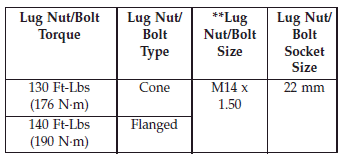
**Use only Chrysler recommended lug nuts/bolts and clean or remove any dirt or oil before tightening.
NOTE: Dual wheels are flat mounted, center piloted.
The lug nuts are a two-piece assembly. When the tires are being rotated or replaced, clean these lug nuts and add two drops of oil at the interface between the lug nut/bolt and the washer.
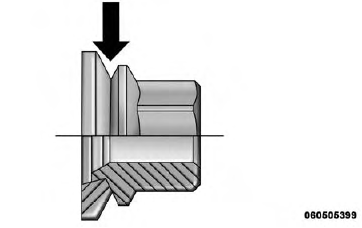
Do not oil wheel studs.
Inspect the wheel mounting surface prior to mounting the tire and remove any corrosion or loose particles.
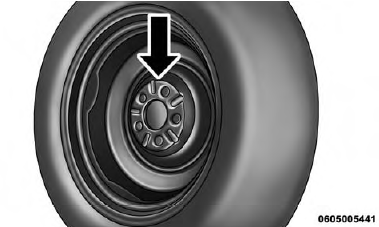
Wheel Mounting Surface
Tighten the lug nuts/bolts in a star pattern until each nut/bolt has been tightened twice.
After 25 miles (40 km) check the lug nut/bolt torque to be sure that all the lug nuts/bolts are properly seated against the wheel.
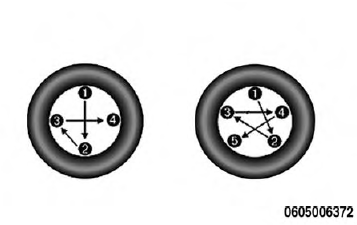
4 And 5 Lug Nuts/Bolts Torque Pattern
WARNING! To avoid the risk of forcing the vehicle off the jack, do not tighten the lug nuts fully until the vehicle has been lowered. Failure to follow this warning may result in personal injury.
READ NEXT:
 Jacking And Tire Changing 1500 Series Trucks
WARNING!
Do not attempt to change a tire on the side of the
vehicle close to moving traffic. Pull far enough off
the road to avoid the danger of being hit when
operating the jack or changing the
Jack Instructions (1500 Series)
WARNING!
Carefully follow these tire changing warnings to
help prevent personal injury or damage to your
vehicle:
Always park on a firm, level surface as far from the
edge of the roadway as possibl
SEE MORE:
Soft-Keys - Display
After pressing the "Display" soft-key the following settings
will be available.
Display Mode
When in this display you may select one of the auto
display settings. To change Mode status, touch and
release the "Day." "Night" or "Auto" soft-key. Then
touch the back arrow soft-key.
Display Brightne
Cooling System
WARNING!
You or others can be badly burned by hot engine
coolant (antifreeze) or steam from your radiator. If
you see or hear steam coming from under the hood,
do not open the hood until the radiator has had time
to cool. Never try to open a cooling system pressure
cap when the radiator is hot.
Engi
